Workplace injuries from unexpected equipment startup are preventable—yet they still happen. A major reason? Poorly executed lockout tagout (LOTO) procedures. At the heart of every reliable LOTO program are clear, accessible, and standardized forms. Printable lockout tagout forms bridge the gap between policy and practice, ensuring every technician follows the same safety protocol—every time.
These forms aren’t just paperwork. They’re accountability tools that document who locked out equipment, when, why, and what energy sources were controlled. When designed and used correctly, printable LOTO forms reduce human error, streamline audits, and reinforce a culture of safety.
Why Printable LOTO Forms Are Essential for Safety Compliance
OSHA’s lockout/tagout standard (29 CFR 1910.147) doesn’t require forms—but it does require documentation. That’s where printable LOTO forms come in. They provide a structured way to meet regulatory expectations while making compliance practical on the shop floor.
Consider this: a maintenance worker shuts down a conveyor system for repairs. Without a form, how do you verify that all energy sources—electrical, pneumatic, hydraulic—were isolated? How do you confirm testing was done before work began? A printable LOTO form turns these steps into a checklist, reducing reliance on memory and increasing transparency.
In real-world environments, printable forms are especially valuable because they: - Work without Wi-Fi or software access - Require no login or training - Are easy to archive and retrieve during audits - Can be posted directly at equipment stations
They’re not outdated—they’re resilient.
Key Elements of an Effective Printable LOTO Form
A good form isn’t just a list of steps. It’s a tool engineered to prevent mistakes. The best printable lockout tagout forms include the following sections:
1. Equipment Identification Clearly state the machine name, ID number, and location. Vague labels like “press machine” lead to confusion. Use precise identifiers: “Hydraulic Press – Line 3, Station B.”
2. Authorized Employee Section Include fields for the worker’s name, role, signature, and time of lock application. This creates personal accountability.
3. Energy Source Checklist List every potential energy source (electrical, mechanical, thermal, etc.) and include checkboxes for isolation verification. Example: - [ ] Main power disconnect secured - [ ] Hydraulic lines depressurized - [ ] Gravity hazard blocked
4. Lock and Tag Details Record lock numbers, tag IDs, and types of locks used. This helps during shift changes or group lockouts.
5. Verification of Isolation A dedicated line for confirming zero-energy state—often with a second technician witnessing the test.
6. Clearance and Re-Energization Document when work was completed, who removed locks, and final approval before restart.
Forms that lack these components risk being ignored or misused. Simplicity helps—but only if critical safety steps aren’t sacrificed for brevity.
Common Mistakes When Using Printable LOTO Forms
Even well-designed forms fail when used incorrectly. These pitfalls undermine safety and compliance:
Using outdated templates A form from 2015 might not reflect current equipment configurations or OSHA interpretations. Review and update forms annually—or after any process change.
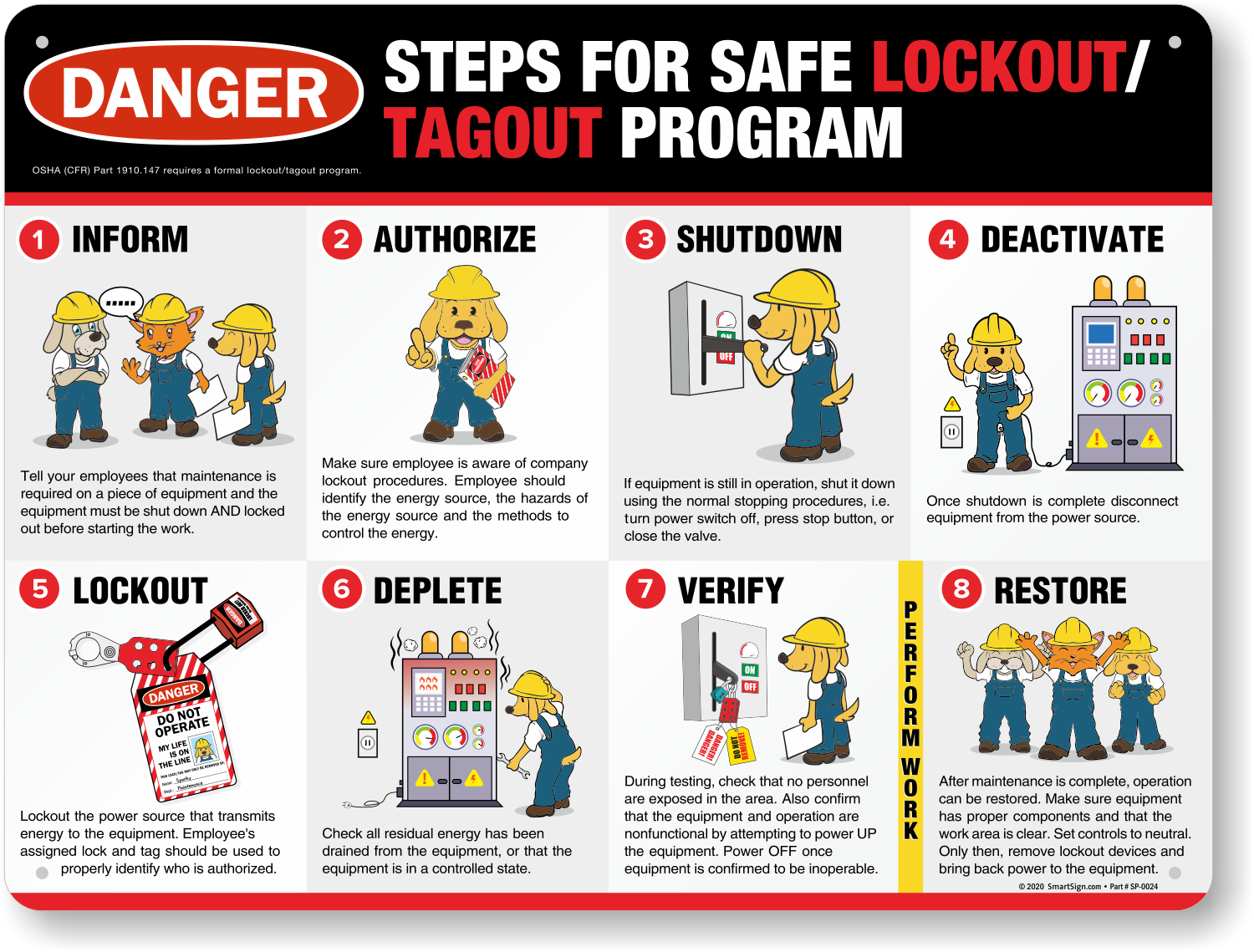
Skipping verification steps Some workers treat the form as a sign-off sheet, not a procedural guide. They check boxes without testing isolation. This is compliance theater, not real safety.
Poor form placement Storing LOTO forms in an office binder means they’re not where they’re needed—on the shop floor. Keep printable copies in labeled safety stations near high-risk equipment.
Ignoring group lockout scenarios One form may not suffice when multiple workers are involved. Use group lockout worksheets that include team leader designation and individual lock tracking.
Handwriting legibility issues Illegible names or times make audits difficult. Encourage clear writing or use pre-printed labels.
Avoiding these issues starts with training—but reinforced by well-designed forms that guide correct behavior.
Where to Find Reliable Printable LOTO Forms
Not all free templates are created equal. Many online forms are generic, missing critical fields or using outdated language. To get usable, compliant printable lockout tagout forms, consider these sources:
1. OSHA’s Website OSHA provides sample procedures and checklists under 1910.147. While not ready-to-print forms, they serve as excellent blueprints for your own templates.
2. National Safety Council (NSC) The NSC offers downloadable LOTO toolkits, including customizable forms. These are professionally designed and align with ANSI standards.
3. Industry-Specific Safety Suppliers Companies like Grainger, Brady, and Seton sell printable LOTO kits tailored to manufacturing, utilities, and labs. Many include bilingual (English/Spanish) versions.
4. Internal Safety Teams The best forms are often developed in-house. Use incident reports and near-miss data to shape fields that reflect your actual risks.
5. Free Template Repositories Sites like SafetyCulture and Creative Safety Supply offer free printable LOTO forms. Verify they include verification and re-energization sections before adopting.
When selecting a template, prioritize clarity over design. A black-and-white form with logical flow beats a flashy but confusing layout.
How to Customize Your LOTO Form for Maximum Impact
A one-size-fits-all form rarely fits anyone perfectly. Customization increases relevance and usage.
Start by mapping your highest-risk equipment. Identify recurring energy sources and maintenance tasks. Then, tailor the form:
- Add equipment-specific shutdown sequences
- Include diagrams or photos of lock points
- Integrate QR codes linking to video instructions
- Design multi-language versions for diverse teams
For example, a printing press LOTO form might include: > “Confirm tension rollers are mechanically blocked before accessing nip points.”
That specificity prevents misinterpretation.
Print on durable, laminated paper or use dry-erase overlays for repeated use. Store in site-specific lockout packets—each assigned to a machine.
Integrating Printable Forms Into Your LOTO Program
Printable forms shouldn’t exist in isolation. They’re part of a larger safety ecosystem.
Train employees to use them as living documents—not just for compliance, but as a step-by-step safety guide. During drills, simulate lockout scenarios using the forms to build muscle memory.
Audit form usage quarterly. Look for: - Consistent completion - Accurate timing - Verification signatures - Proper archiving
Use findings to refine training or redesign forms.

Pair printed forms with physical toolkits: lockout hasps, group boxes, tag printers, and lock stations. This creates a complete LOTO solution that’s easy to access and hard to bypass.
Top 5 Free Printable LOTO Form Templates
Here are five high-quality, downloadable printable lockout tagout forms—tested for clarity, compliance, and usability:
| Provider | Format | Key Features | Link |
|---|---|---|---|
| OSHA (Sample Procedure) | PDF/Word | OSHA-compliant structure, verification steps | osha.gov |
| Creative Safety Supply | Bilingual, visual layout, equipment-specific fields | [creativesafetysupply.com] | |
| SafetyStore (MSHA-Aligned) | Mining and heavy equipment focus | [safetystore.com] | |
| SafetyCulture (iAuditor) | PDF/Editable | Customizable, mobile-friendly design | [safetyculture.com] |
| Brady Corporation | Lock/tag tracking, group LOTO support | [bradymenus.com] |
Always verify that any downloaded form includes space for verification and re-energization approval—missing in many free versions.
Real-World Use Case: Printing Plant Reduces Incidents by 70%
A mid-sized commercial printing facility in Ohio struggled with LOTO compliance. Technicians skipped documentation, relying on verbal checks. After two near-misses in six months, management introduced site-specific printable LOTO forms.
They customized templates for each press type, added labeled lock-point diagrams, and placed forms in sealed pouches on every machine. Supervisors conducted weekly audits using a 10-point checklist.
Within a year: - LOTO documentation improved from 42% to 98% compliance - Unauthorized re-energization dropped to zero - OSHA audit score increased by 35 points
The change wasn’t driven by new software or expensive tools—just better, printable forms used consistently.
Final Thoughts: Make Safety Visible, Not Virtual
Digital LOTO systems have their place—but printable lockout tagout forms remain vital. They work in dust, rain, and power outages. They don’t crash, freeze, or require updates. Most importantly, they keep safety visible at the point of action.
Don’t settle for generic templates. Build or choose forms that reflect your equipment, your team, and your risks. Print them clearly, store them accessibly, and audit their use like any other safety control.
A well-designed, printable LOTO form doesn’t just document safety—it enforces it.
FAQs
Where can I download free printable lockout tagout forms? Reputable sources include OSHA’s website, Creative Safety Supply, SafetyCulture, and Brady Corporation. Always verify forms include verification and re-energization sections.
Are printable LOTO forms OSHA-compliant? OSHA doesn’t mandate forms, but requires documented procedures. Printable forms are a recognized way to meet this requirement when properly designed and used.
How often should LOTO forms be updated? Review annually or after equipment changes, incidents, or process updates. Outdated forms create false confidence.
Can I use the same form for all machines? Only if energy sources and shutdown steps are identical. For safety, use equipment-specific forms whenever possible.
Should LOTO forms be archived? Yes. Keep completed forms for at least one year for audit and incident investigation purposes.
Do printable forms work for group lockouts? Yes, but use group-specific templates with team leader designation, individual lock tracking, and coordination fields.
What paper type works best for LOTO forms? Use laminated or waterproof paper for durability. Consider dry-erase overlays for repeated use at shared stations.
FAQ
What should you look for in Printable Lockout Tagout Forms: Free Templates & Best Practices? Focus on relevance, practical value, and how well the solution matches real user intent.
Is Printable Lockout Tagout Forms: Free Templates & Best Practices suitable for beginners? That depends on the workflow, but a clear step-by-step approach usually makes it easier to start.
How do you compare options around Printable Lockout Tagout Forms: Free Templates & Best Practices? Compare features, trust signals, limitations, pricing, and ease of implementation.
What mistakes should you avoid? Avoid generic choices, weak validation, and decisions based only on marketing claims.
What is the next best step? Shortlist the most relevant options, validate them quickly, and refine from real-world results.